Questionnaire en ligne
Quenlig est un système autonome permettant de faire des cours et TP sur le Web. Il est adapté aux cours pour lesquels des réponses textuelles sont facilement analysables. Par exemple Unix, Python, SQL, ...
Vous pouvez essayer le
TP Unix Quenlig
tout de suite.
ATTENTION : Les 20 premières questions ne concernent
pas Unix, elles sont là pour vérifier que vous comprenez
comment utiliser le système.
Online interactive tutorial
Quenlig is a standalone system allowing the creation of interactive web tutorials and quizzes. The system analyses the students' text answers, so it is perfectly adapted to create lectures and practical work on Unix, Python, SQL, ...
If you read and understand french, then go ahead and try the
Unix training session with Quenlig.
Notice: The first 20 questions aren't about Unix,
their purpose is to check that you understand how to use the system.
Download
Repository: GitHub
2017-08-22 QUENLIG-2.6.2.tar.gz
Many bug fixes and small enhancements.
Currently a problem with tip boxes hidden by menu elements,
so wait some days before uploading if you want a perfect
experience.
2017-03-05 QUENLIG-2.6.1.tar.gz
Many bug fixes and some new functionnalities :
- Students must wait if they give too many bad answers to a question ('suspend' parameter).
- Add a spoiler plugin (disabled by default) about answer length, and missing characters in the answer.
2017-02-11 QUENLIG-2.6.0.tar.gz
This release is multi-threaded and now works with hundreds
of students. Other news :
- Add 'contains_one_of' test
- The 'comment' plugin can now send mail, if the teacher mail is defined, it receives Python traceback.
- The Developer role can evaluate a Python expression.
2016-09-28 QUENLIG-2.5.2.tar.gz
Upgrade is recommended because of some
big bug fixes.
New functionnalities:
- Add a 'title' option for the session.
- Enhance the print version of the course documentation.
- Add a plugin to let the user change the interface language.
- The 'competence' plugin can now export a CSV with the star level.
- The bad answers list display the question because it is student dependent if Choice or Random are used.
- Add a plugin to retrieve student name and mails from LDAP, Configuration is done in the command line.
2016-08-09 QUENLIG-2.5.1.tar.gz
Bug fixes.
2016-06-09 QUENLIG-2.5.0.tar.gz
Now it runs with Python3.
Many bug fixes and usability enhancements
2015-10-30 QUENLIG-2.4.0.tar.gz
It should be fully compatible with old questionnaries.
Many new things, look the documentation to have more information:
- QUENLIG now displays page with UTF-8 character encoding.
- The storage of students information is now done as Python tuples.
- The course documentation can be automaticaly generated from the questions with the 'courses' and 'before' attributes. The HTML tag 'KEY' is used to create an index of keywords.
- The file 'QUENLIG/Questions/.../HTML/questions.js' is integrated in the web page for the questionnary.
- It is possible to restrict the usage to a single IP address, for example a web proxy.
- When using {{{}}} in a question, there are new functionnalities:
- {{{ shuffle}}} The toggles and radio order is randomised
- {{{toggle}}}
- {{{!radio}}} there are mixable.
- The 'competences' plugin allows with the 'Grade' test to define competences and display the question list by competence. There are nice graphics to see the student progression. The student can choose the "best" question in a competence or in the full question list. It is the question needing the more work.
- It is possible to Grade for a tuple of teachers (competence) in one time.
- It is possible to have multiple versions for the same question, so the student can retry the same question with other values. The 'Choice' test make it easy to do so. This functionnality has not been tested outside 'competence' plugin, in this case, 'allowed_to_change_answer' plugin is needed.
- The required question list can now have attributes:
required=[
# The question must only be seen, not answered
"foo{unrequired}",
# In the answered questions bloc: display the 'before' attribute
"bar{before}",
# In the answered questions bloc: do not display the question
"linux{hide}",
]
2014-10-03 QUENLIG-2.3.11.tar.gz
Bug fix release.
2014-04-09 QUENLIG-2.3.10.tar.gz
This release adds a command line option to run any plugin
(for example 'export_csv').
The default student answer can now be generated by a function.
The users can now have multiple sessions and so pages in their browser.
The unix questionnary (in french) has been updated.
2013-11-14 QUENLIG-2.3.9.tar.gz
This release add a Random value chooser to generate questions with random parts.
It also add a plugin to display graphicaly the students paths to the good answer.
In the list of bad answers for a question,
the answers with the same canonization are now grouped together.
2012-12-15 QUENLIG-2.3.8.tar.gz
This release fixes a JavaScript injection problem.
The server no more freeze when browsers open a connection
without sending the HTTP request.
The questions have now an attribute to define the maximum time
allowed to answer the question.
There is an experimental plugin allowing to automatically
evaluate de difficulty level of questions and the level of students,
this is done by analysing the answer time of students.
2012-05-10 QUENLIG-2.3.7.tar.gz
Indicates who copy on who and how much.
2012-04-16 QUENLIG-2.3.6.tar.gz
Bug fixes release. Better display of cheaters.
2012-03-12 QUENLIG-2.3.5.tar.gz
The previous release was not working.
2012-03-10 QUENLIG-2.3.4.tar.gz
The plugins can now define a command line option,
that can also be modified on a web page.
A maximum working time can now be allowed to students.
The session start/stop time can now be defined per student.
2012-02-21 QUENLIG-2.3.3.tar.gz
The teachers can now grade and comment students answers.
The Teacher role has been splited to simplify the interface.
2012-02-01 QUENLIG-2.3.2.tar.gz
The question definition in Python can now be edited
from the web page.
2012-01-22 QUENLIG-2.3.1.tar.gz
This version is quite stable.
It has now all the functionnalities of the version 1.
There is now an english documentation
2011-03-16 QUENLIG-2.1.tar.gz
Réécriture complète de QUENLIG afin de simplifier sa maintenance
et son évolution. Cette version fonctionne mais elle n'est
pas stable. Seul les TP 'unix' et 'cisco' ont été testés.
Il reste encore beaucoup de bug coté administration de Quenlig.
Coté étudiant cela fonctionne bien.
2009-11-27 QUENLIG-1.2.tar.gz
443Kb, Amélioration des sujets de TP Unix/CISCO.
Le nouveau noyau n'étant pas prêt il est inchangé.
2008-07-02 QUENLIG-1.1.tar.gz
382Kb, Amélioration des sujets de TP Unix/CISCO.
Le nouveau noyau n'étant pas prêt il est inchangé.
2007-12-21 QUENLIG-1.0.tar.gz
373Kb, Version intermédiaire avant de grands boulversements.
Ajout de TPs CISCO.
2007-05-15 QUENLIG-0.9.tar.gz
631Kb, correction bugs + améliorations du questionnaire unix.
2007-02-01 QUENLIG-0.8.tar.gz
550Kb, correction d'un problème de sécurité
2007-01-25 QUENLIG-0.7.tar.gz
544Kb, questions: 233 unix, 74 python
2006-08-29 QUENLIG-0.6.tar.gz
448Kb, questions: 185 unix, 72 python
2006-06-22 QUENLIG-0.5.tar.gz
400Kb, questions: 185 unix, 32 python
Documentation
La documentation de Quenlig contient tout ce qui est nécessaire pour comprendre ce que c'est, comment ça marche et comment ajouter des questionnaires.
Documentation
The Quenlig documentation contains information on what it is all about, how it works and how to add new tutorials.
Chargement des sources
Les sources (licence GPL) contiennent le système lui-même, sa documentation et
- un TP Unix (10 heures),
- un embryon de cours Python pour enfant,
- des TP d'initiations aux routeurs CISCO (12 heures), chaque étudiant répond à des questions dépendant de sa place dans le réseau).
Sources download
The source (GPL license) contains the system, the documentation, and several tutorials in french.
- a Unix quizz (10 work hours),
- the very first stages of a Python tutorial for children,
- A CISCO tutorial (12 work hours), in which each student's answers depend on where they are placed within the network.
Copies d'écran
Screenshots
Ce que voit l'étudiant quand il arrive sur la première question du TP Unix.
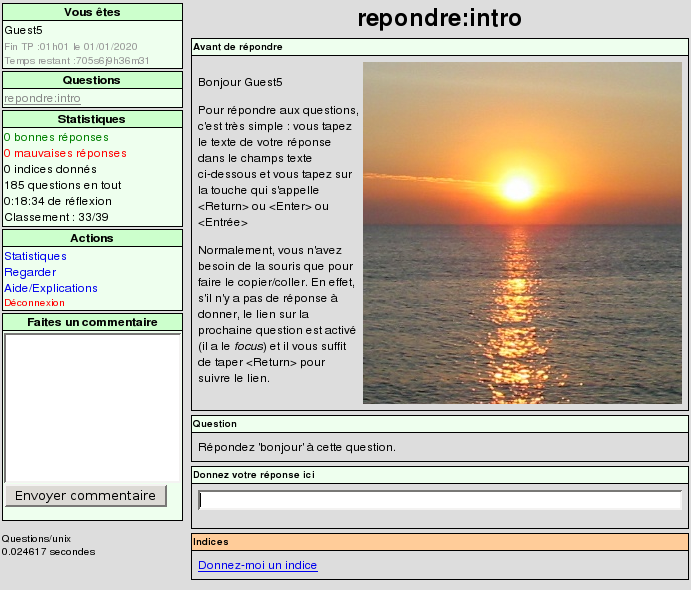
The first question the student must answer in the Unix quizz.
Un enseignant peut voir plus d'informations sur la question :
- Tous les indices
- Des statistiques
- Les mauvaises réponses
- Les commentaires déposés
- La description graphique de la question
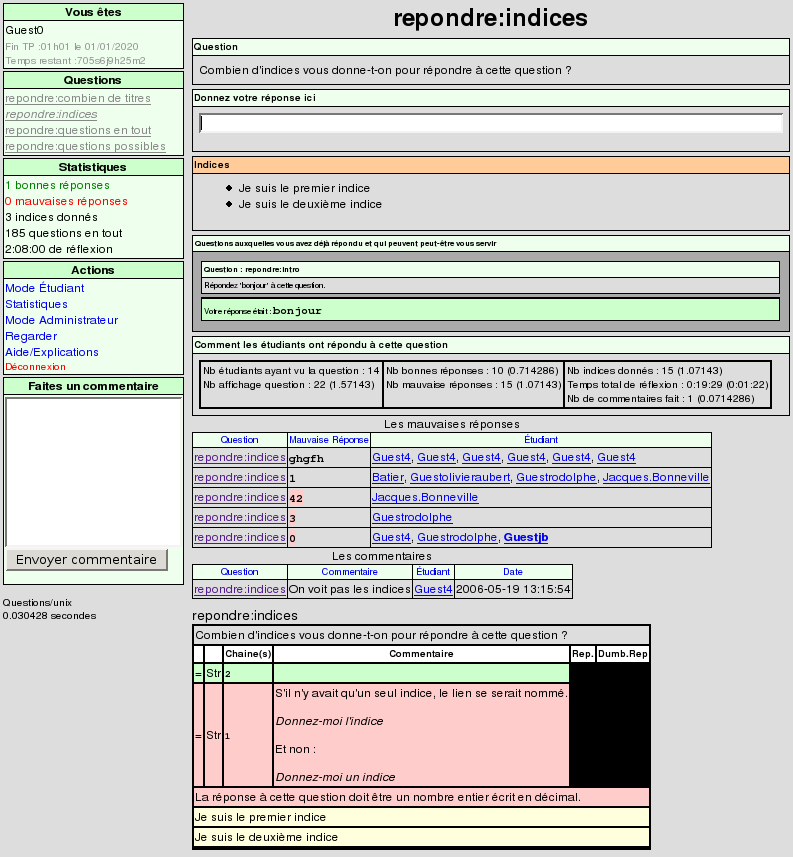
A teacher may see more information about the question.
- All the tips
- Statistics
- Bad answers list
- Given Comments
- Schematic description of the question
Les enseignants peuvent voir des statistiques sur l'ensemble des étudiants.
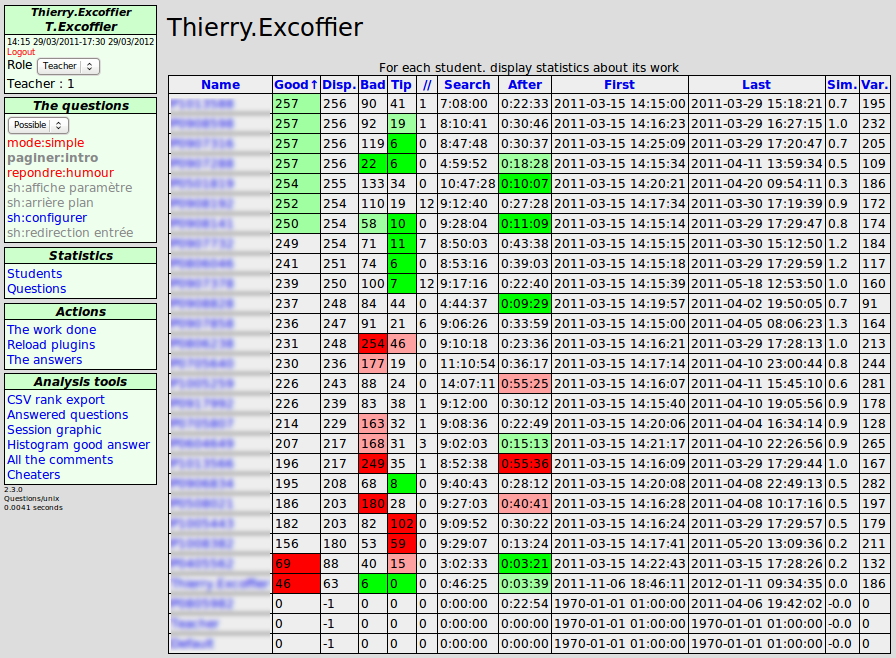
Teachers may see statistics about students.
Les enseignants peuvent voir l'ensemble des commentaires déposées.
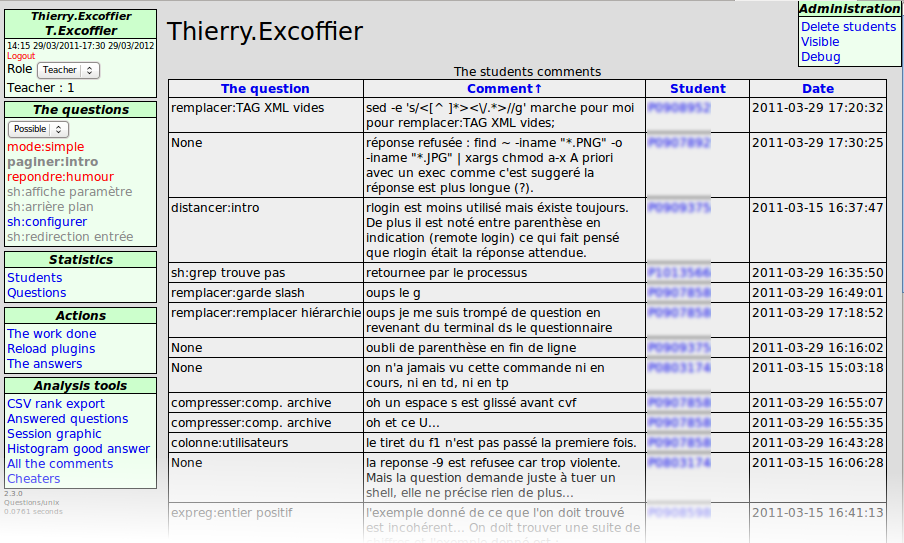
L'administrateur gère les droits et options des utilisateurs et des différents rôles qu'ils peuvent prendre (étudiant, enseignant, auteur de contenu, administrateur).
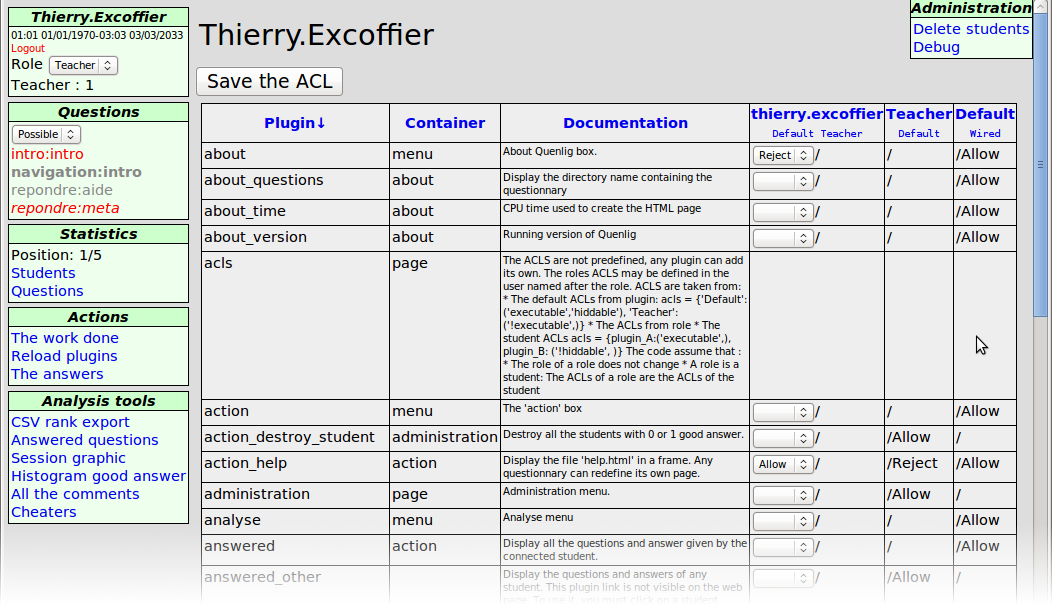
The administrator manages rights and options of the individual users and of the student, teacher, author and administrator roles.
Pour qu'un étudiant puisse voir une question, il doit avoir répondu à toutes les questions prérequises.
A droite vous voyez le graphe des questions Python.
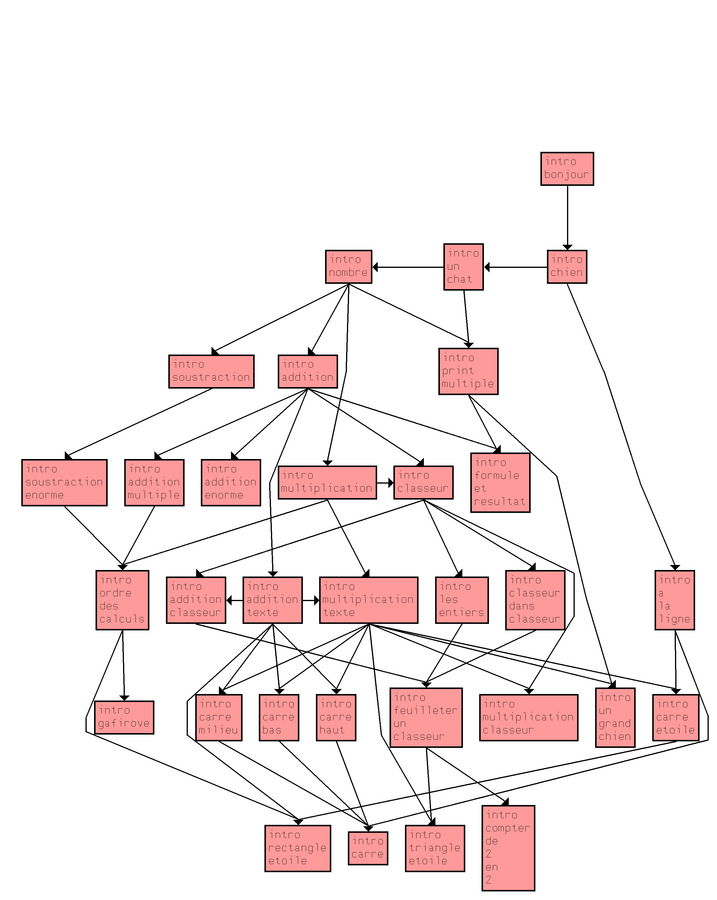
To see a question, the student must have correctly answered all the required questions.
The graph to the left displays the dependencies between the Python questions.
Une page SVG intéractive permettant de voir intuitivement :
- Question vue (transparence)
- Nb bonnes réponses (vert)
- Nb mauvaises réponses (rouge)
- Nb indices demandés (bleu)
- Temps passé (gris)
- Nb commentaires
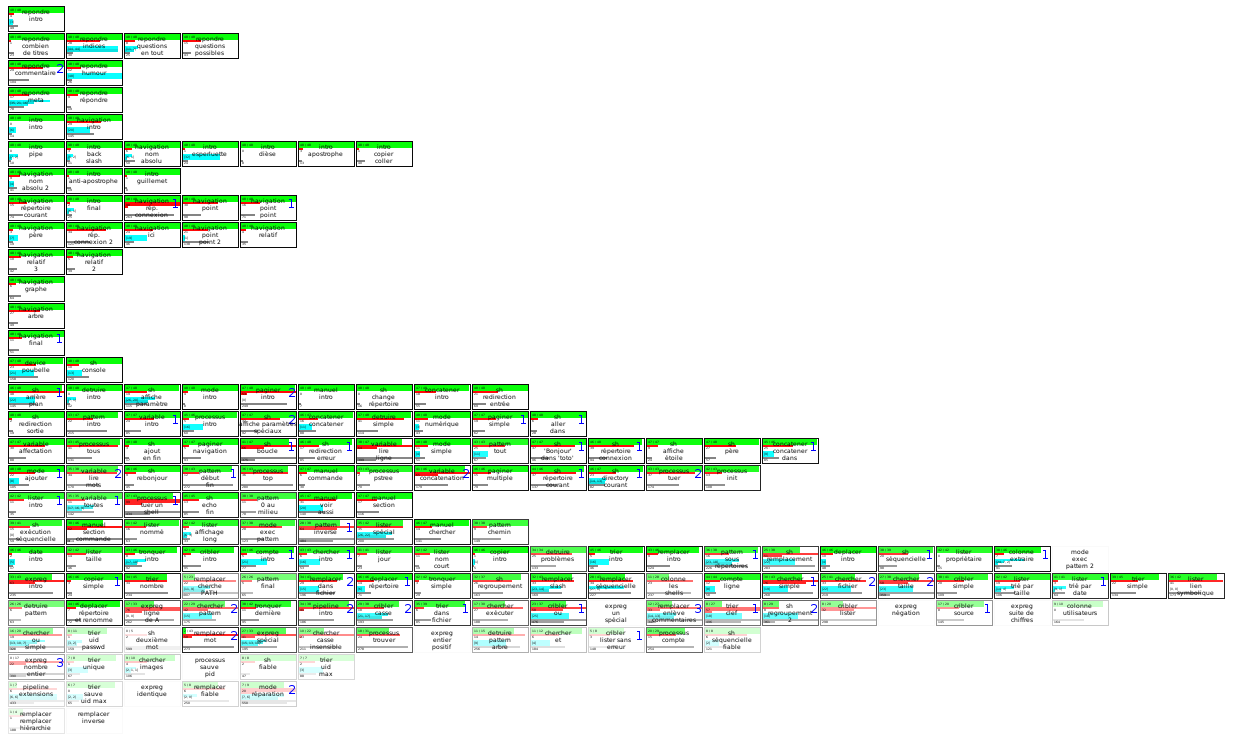
An interactive SVG page intuitively displaying data about questions:
- Displayed question (transparency)
- # good answers (green)
- # wrong answers (red)
- # tips given (blue)
- Reflection Time (gray)
- # comments
Le créateur des questions peut voir les chemins suivis par les étudiants pour arriver aux bonnes/mauvaise réponses.
L'épaisseur du trait représente le nombre d'étudiants.
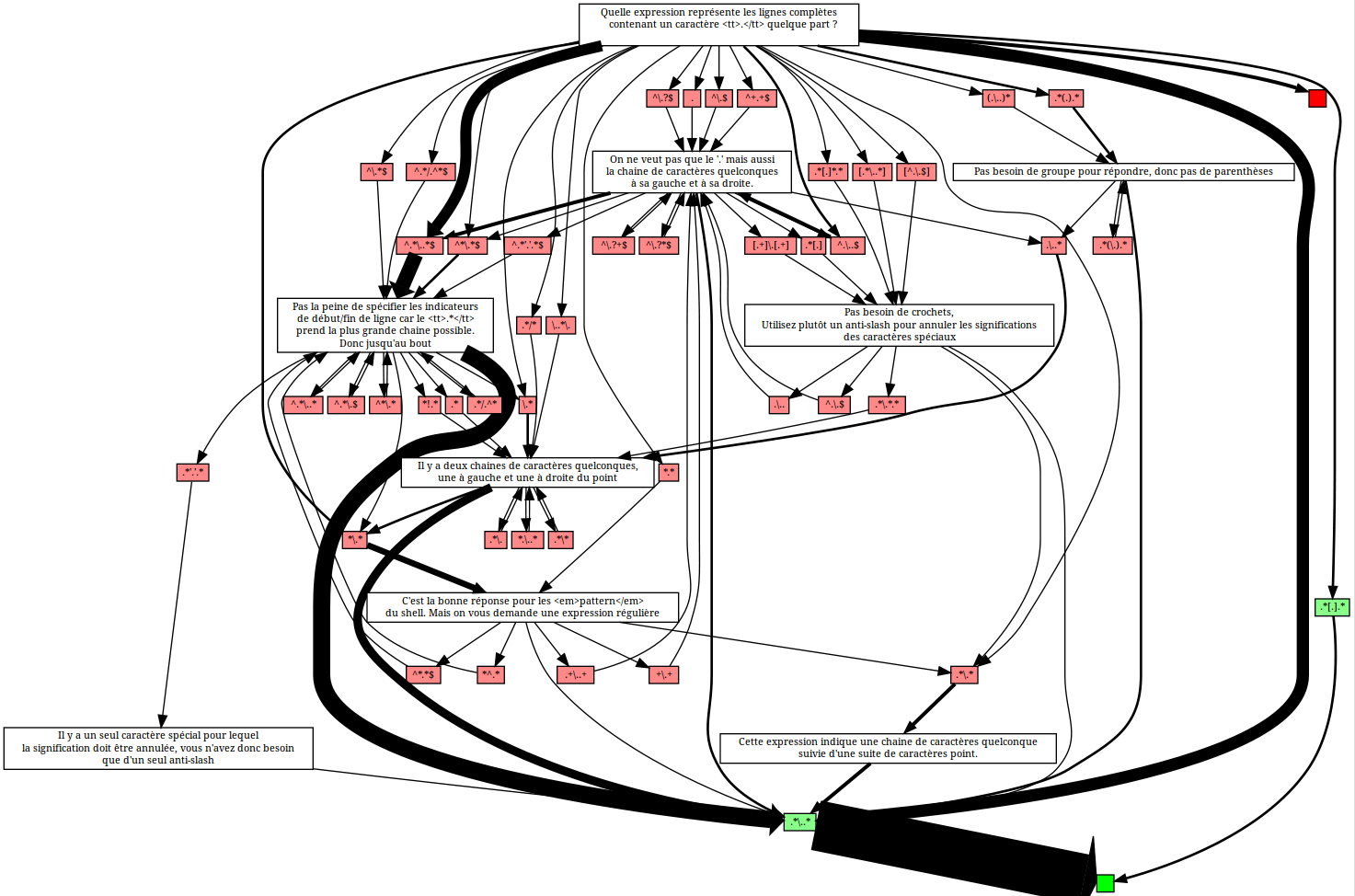
The questions' author may see the paths followed by the students to reach the good/bad answers.
Arc widths indicate the number of students.
Articles
Papers
Yves Caniou and Thierry Excoffier.
E-learning with Quenlig: an online questionnaire.
In IEEE EDUCON'12, Collaborative Learning & New Pedagogic Approaches in Engineering Education.
Pages 9, May 2012.